
Brahma F4
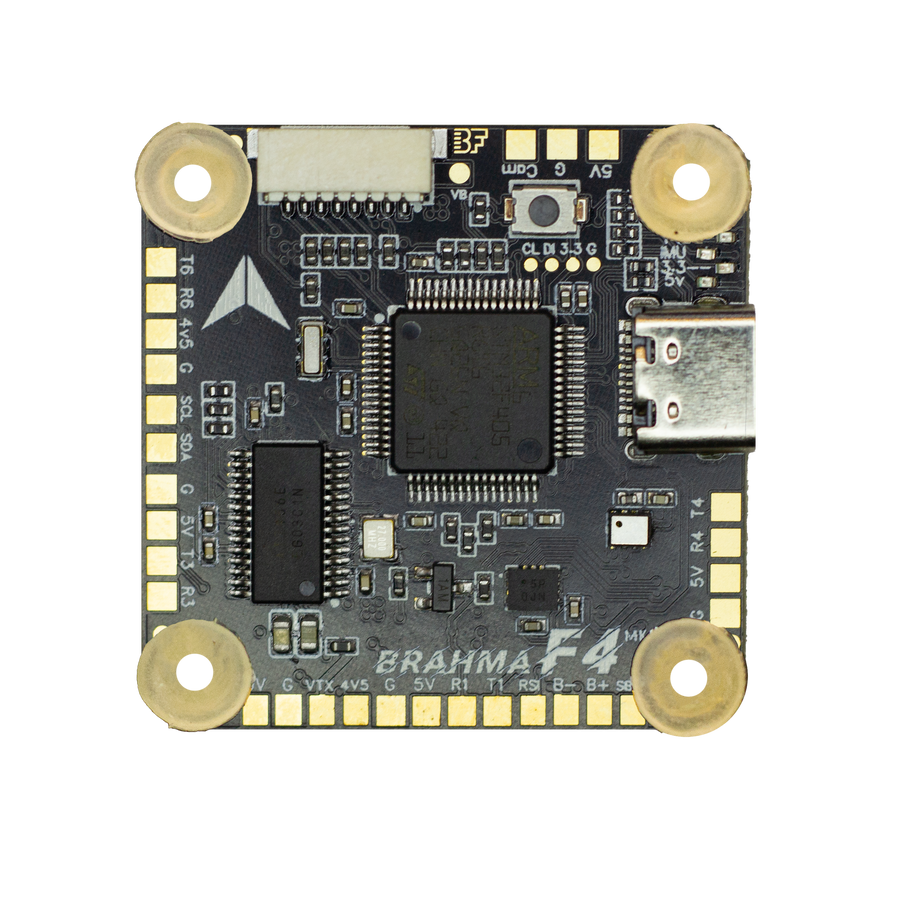
The actual 3D design of the flight controller. Turn it over and look at it from any side.
Where the Brahma F4 goes.
Four M3 screws come up through the frame on the standard 30.5 × 30.5 mm pattern. Scroll to build it in.
Grommets first.
A soft TPE grommet presses into each mounting hole, so frame vibration stays out of the gyros. We injection-mould them ourselves.
Vishnu, then Brahma.
The Vishnu 50 slides down the screws first. The Brahma F4 sits on top. Shown here with a Vishnu 50.
Four nuts. One cable.
An 8-pin cable links the two boards. Tighten four nuts, close the frame, and you are wired.
One stack.
Many machines.
Every part,
up close.
Scroll to fly across the real board model.
STM32F405
A proven F4 processor: stable loops for freestyle, cinematic and long-range builds.
USB Type-C
Configure, flash and tune over a single modern connector.
8 motors
One plug for the 4-in-1 ESC carries M1 to M4. M5 to M8 are on pads underneath.
4 UARTs + I²C
Receiver, GPS, VTX and telemetry on the edge pads, with SCL and SDA for a compass.
9V, 5V, 4.5V
A 9V rail for the VTX, 5V for accessories, and 4.5V from USB so the receiver stays alive on the bench. SBUS and RSSI sit in the same row.
The other side.
Blackbox memory and the regulators that feed everything on board.
32MB Blackbox
Onboard flash records every flight for tuning and diagnosis.
Two regulators
Separate 5V and 9V supplies, each good for 2 amps.
M5 to M8
Solder pads for a second ESC: hex and X8 layouts.
LED strip pads
Two sets of addressable LED pads, one on each side.
Brahma F4 specifications
An STM32F405 flight controller for Betaflight, INAV and ArduPilot, with a BMI270 gyroscope, four UARTs, eight motor outputs and 32MB of Blackbox memory.
| Processor | STM32F405 |
|---|---|
| Gyroscope | BMI270 |
| Barometer | DPS310 |
| On-screen display | Analog OSD |
| Blackbox | 32MB onboard flash |
| USB | Type-C |
| Firmware | Betaflight, INAV, ArduPilot |
| UARTs | 4 |
| I²C | Yes, for compass and external sensors |
| Motor outputs | 8 (M1–M8) |
| 5V output | 2A total |
| 9V output | 2A, for digital VTX |
| 4.5V output | Powered over USB, for the receiver while configuring |
| 3.3V output | For compasses and sensors |
| Digital FPV | DJI direct-solder pads |
| Inputs | RSSI, SBUS |
| Protection | Reverse polarity, USB ESD, power filtering |
| Mounting | 30.5 × 30.5 mm (M4) |
| Dimensions | 37 × 37 × 5 mm |
| Weight | 9 g |
| Made in | India: designed in India, assembled in Bally, West Bengal |
Book your Brahma F4
Message us on WhatsApp. We reply with availability, price and delivery time, and help you pick the right parts for your build.


Brahma F4 user manual
Point at any label to see the wire and the part it belongs to. Step through the flashing guides. Zoom in on anything.
Point at a label or a wire to trace it. Click to keep it lit. Double-click to zoom.
Read the Brahma F4 manual as text
BRAHMA F4 – Specifications 1/3
| Product Name | DARKMATTER BRAHMA F4 MKIV |
|---|---|
| Product Category | Flight Controller |
| Processor (MCU) | F4 – STM32F405 |
| Gyroscope (IMU) | BMI270 – 6 Axis |
| Barometer | DPS310 |
| On-Screen Display | AT7456E |
| Blackbox | 32MB Winbond Blackbox |
| USB Port Type | Type-C |
| Supported Flight Controller Firmware | BetaFlight (Default), iNav, Ardupilot |
| Power Input | 2-6S LiPo (Through G, V pins/pads from the 8-pin connector or 8-pads on the bottom side) |
| Mounting | 30.5 X 30.5mm (4mm hole size) |
| Dimensions | 37mm(L) x 37mm(W) x 5mm(H) |
| Weight | 9g |
BRAHMA F4 – Specifications 2/3
| 5V Output | 7 groups of 5V output, four +5V pads and 1 BZ+ pad (used for Buzzer) on front side, and 2x LED 5V pads. The total current load is 2A. |
|---|---|
| 9V Output | 1 groups of 9V output, one +9V pad on front side. The total current load is 2A. |
| 4v5 Output | 1 4.5V output, 500mA from USB to connect receiver or other peripherals |
| 3.3V Output | Supported. Up to 500mA current load. |
| Traditional BetaFlight LED Pad | Supported. 5V, G and LED pads on the bottom side. Used for WS2812 LED controlled by BetaFlight firmware. |
| Buzzer | BZ+ and BZ- pad used for 5V Buzzer |
| Motors Supported | 8 Motors |
| ESC Signal | M1 - M8 on bottom side |
| DJI Air Unit Connection Way | Supported: Direct soldering |
BRAHMA F4 – Specifications 3/3
| BOOT Button | Supported. Press and hold BOOT button and power the FC on at the same time will force the FC to enter DFU mode, this is for firmware flashing when the FC gets bricked. |
|---|---|
| RSSI Input | Supported. Named as RSI on the front side. |
| SmartPort | Use any TX pad of UART for the SmartPort feature. |
| UART | 4 sets(UART1, UART3(For ESC Telemetry), UART4, UART6) |
| ESC Telemetry UART | R3(UART3) |
| I2C | Supported. SDA & SCL pads on front side. Used for magnetometer, sonar, etc. |
| BETAFLIGHT TARGET NAME | BRAHMA_F405 |
| OPERATING TEMPERATURE | -10°C TO 70°C.. |
| COUNTRY OF ORIGIN | INDIA |
DIMENSIONS
Front · Back · 30.5MM · 4MM · 37MM · 30MM · Side · 5MM · 1.6MM
Flight Controller Layout
MCU - STM32F405 · OSD Chip · Gyro – BMI270 · Baro – DPS310 · Boot Button · 8Pin ESC Connector · Type C Port · UART #6 · VTX · UART#1 · Buzzer · FPV CAM · ESC Solder Pads M1-M4) · 9V/2A BEC · 5V/2A BEC · LED Strip · 32MB Blackbox · Reverse Polarity Protection · USB ESD Protection · Dual 3.3V LDO · Status LEDs · ESC Solder Pads (M5-M8) · UART #4 · UART #3 · I2C · 4V5 PAD · RSSI · SBUS
Flight Controller – STANDARD CONNECTION PROTOCOL
GPS & Compass · FPV CAM · ESC Solder Pads · LED Strip · T6 · R6 · 5V · SCL · SDA · B+ · B- · CAM · VTX · VTX · 9V · IBUS RECEIVER · ELRS RECEIVER · SBUS RECEIVER · SBUS · RX · TX · Buzzer · FC Status · 3.3v IMU · 3.3v FC · 5v · LED INDICATORS
4 in 1 ESC Plug and Play Connection
CURRENT · MOTOR 1 · MOTOR 2 · MOTOR 3 · MOTOR 4 · GROUND · VOLTAGE · TELEMETRY · Motor 2 · Motor 4 · Motor 3 · Motor 1 · BETAFLIGHT STANDARD CONNECTOR
ESC Direct Soldering Connection
Motor 2 · Motor 4 · Motor 3 · Motor 1 · CURRENT · MOTOR 4 · MOTOR 3 · MOTOR 2 · MOTOR 1 · GROUND · VOLTAGE
2 x 4 in 1 ESC Direct Soldering Connection For 8 Motors
MOTOR 8 · MOTOR 7 · MOTOR 6 · MOTOR 5 · GROUND · BATTERY
CONNECT BRAHMA F4 WITH IBUS RECEIVER
IBUS RECEIVER · *IF USING BETAFLIGHT KINDLY REFLASH WITH IBUS PROTOCOL SELECTED AND THEN TURN ON Serial Rx ON UART 1
Single ESCs Direct Soldering Connection For 8 Motors
Flight Controller – Package Contents
Darkmatter – BRAHMA F4 Flight Controller x 1 · SH 1.0mm 30mm-length 8pin Cable(for FC-ESC connection) x 1
HOW TO FLASH ARDUPILOT ON BRAHMA F4 (1/2)
- PRESS AND HOLD THE BOOT BUTTON and connect to PC and open STM32 Cube Programmer
- CLICK ON CONNECT Remember the blue option will be USB
- Open the second menu item -> Erasing & Programming
- Before flashing, we need to do Full Chip Erase. Press the Full chip erase and wait for the log to ask you disconnect device, after which you disconnect the device
- Click on connect again to connect to the FC
- Go to the first tab and then click on OPEN FILE and load the firmware by downloading it from the QR Code below
- Click on the Download button once the file has been loaded and then wait for the firmware flashing to complete
HOW TO FLASH ARDUPILOT ON BRAHMA F4 (2/2)
- Open the Mission Planner application
- Select the COM port which shows up as Ardupilot and then click on connect
HOW TO CONNECT HERELINK WITH BRAHMA F4
Herelink SBUS Herelink ‘S Bus out 1’ to BRAHMA H4 RX6 (Serial 4) Herelink GRD to a BRAHMA F4 GND SERIAL4_PROTOCOL=23 (RCIN) SERIAL4_OPTIONS=3 (SwapTXRX - RX6 becomes TX6). Herelink UART connector Herelink RXD to the BRAHMA F4 TX1 (Serial 4) Herelink TXD to the BRAHMA F4 RX1 (Serial 4) Set SERIAL4_PROTOCOL= 2
HOW TO CONNECT COMPANION COMPUTER (PI) WITH BRAHMA F4
BRAHMA SETUP : LET'S USE THE UART 4 IN BRAHMA TO CONNECT TO THE RASPBERRY PI, YOU CAN REFER TO THE CONNECTION DIAGRAM ON THE SIDE FOR CONNECTING THEM THEN IN MISSION PLANNER, GO TO FULL PARAMETER LIST SET THE FOLLOWING: • SERIAL4_PROTOCOL = 2 • SERIAL4_BAUD = 921 COMPANION COMPUTER SETUP: YOU HAVE TO ENABLE SERIAL BY: > sudo raspi-config THEN, Go to: • Interface Options → Serial Port • “Login shell over serial?” → No • “Enable serial hardware?” → Yes · You can use any model of Pi
HOW TO FLASH BETAFLIGHT ON BRAHMA F4 (1/2)
- PRESS AND HOLD THE BOOT BUTTON and connect to PC and open BETAFLIGHT CONFIGURATOR
- ONCE IN DFU CLICK ON UPDATE FIRMWARE
- SELECT BOARD = BRAHMA_F405 - MAKE SURE FULL CHIP ERASE IS ON
- SELECT THE PROTOCOL OF THE RADIO YOU ARE USING
- Include Magnetometers if you plan on using one
- Select the Motor Procol : Let is be DSHOT if you are using VISHNU, else select accordingly, the other single ESCs available on the market mostly use PWM
- CLICK ON LOAD Load Firmware [Online] and wait for it to build and download.
- CLICK ON LOAD Flash Firmware
HOW TO FLASH BETAFLIGHT ON BRAHMA F4 (2/2)
- WAIT A BIT FOR THE ERASING AND FLASHING TO COMPLETE
- CLICK ON CLOSE
- Enter the following in the command box, and enter save at last to save and reboot Click here to download the txt file which you can copy paste
- CLICK ON CLI FROM THE LEFT HAND SIDE MENU
HOW TO FLASH INAV ON BRAHMA F4 (1/2)
- ONCE IN DFU CLICK ON FIRMWARE FLASHER
- PRESS AND HOLD THE BOOT BUTTON and connect to PC and open INAV CONFIGURATOR
- CLICK ON LOAD FIRMWARE LOCAL
- SCAN TO DOWNLOAD THE HEX FILE AND SELECT THAT
- CLICK ON LOAD FLASH FIRMWARE
- WAIT A BIT FOR THE ERASING AND FLASHING TO COMPLETE
HOW TO FLASH INAV ON BRAHMA F4 (2/2)
- SELECT THE TYPE OF CRAFT YOU ARE MAKING
- SELECT THE UART & THE RECEIVER PROTOCOL FOR RX
- SELECT THE UART PORT FOR GPS
• Warranty Period: The BRAHMA F4 Flight Controller comes with a 6-month warranty from the date of purchase. • Proof of Purchase: Please retain and provide a copy of the purchase invoice for warranty claims. • Exclusions: The warranty does not cover any physical damage to the product, including water damage or burns. • Warranty Process: If a claim is made within the warranty period, we will examine the PCB for physical damage. If the product is eligible, we will provide a replacement at no additional cost. Your satisfaction and product performance are our top priorities. For any warranty-related inquiries, please contact us at +91-8017193277.
• Warranty Period: The BRAHMA F4 Flight Controller comes with a 6-month warranty from the date of purchase. • Proof of Purchase: Please retain and provide a copy of the purchase invoice for warranty claims. • Exclusions: The warranty does not cover any physical damage to the product, including water damage or burns. • Warranty Process: If a claim is made within the warranty period, we will examine the PCB for physical damage. If the product is eligible, we will provide a replacement at no additional cost. Your satisfaction and product performance are our top priorities. For any warranty-related inquiries, please contact us at +91-8017193277. · BRAHMA F4 Flight Controller - 6 Months Warranty
- Choosing a selection results in a full page refresh.
- Opens in a new window.